
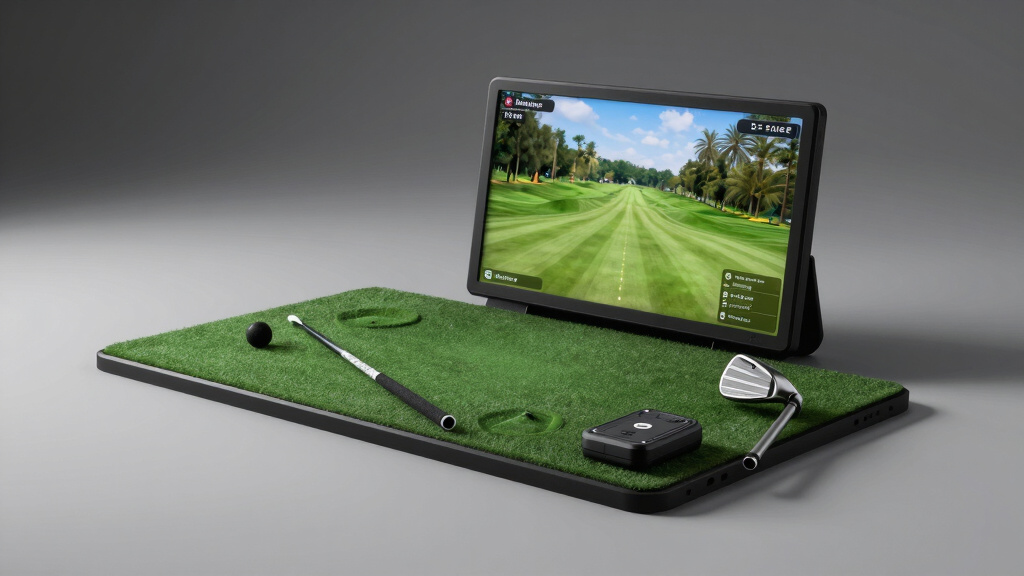
Practicing golf indoors can feel cramped and limiting. Your swings get blocked by walls and setup takes forever, killing any serious flow. Missing proper feedback leaves you guessing what went wrong.
PHIGOLF offers a compact, sensor-based swing stick that lets you access over 38,000 courses with no bulky gear. Garmin’s Approach R10 uses a tripod-mounted launch monitor to track detailed swing data like speed and spin for a more analytic approach.
Swinora steps in with advanced metrics and 3D simulation, filling the gap for golfers who want immersive feedback through precise ball trajectory and environmental adjustments.
- Affordable Golf Simulators That Enhance Your Game at Home
- 1. PHIGOLF Portable Home Simulator with Interactive Motion Sensor and Global Course Access
- 2. Garmin Approach R10 Portable Launch Monitor & Simulator Bundle with Charger and Tripod Stand
- 3. Swinora Portable Golf Launch Monitor with 3D Simulation and Advanced Swing Metrics
- 4. OptiShot Orbit Golf Simulator with Launch Monitor and Orion Software – 20 Courses Included
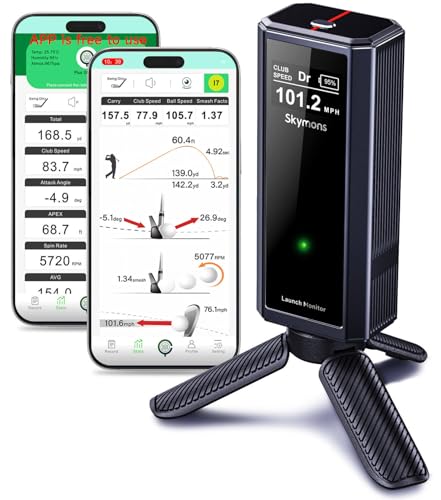
- 5. Skymons Portable Launch Monitor GX-02 with 10-Hour Battery & Advanced Swing Metrics
- Key Specs Compared: Top Best Cheap Golf Simulator Features
- Which Features Matter Most When Choosing the Best Cheap Golf Simulator?
- Frequently Asked Questions
- What features should I look for in the best cheap golf simulator?
- How portable are cheap golf simulators for home or travel use?
- Can cheap golf simulators offer accurate swing analysis?
- Are subscription fees necessary for full access to golf simulator features?
- How do golf simulators handle course variety and multiplayer options?
- Finding a cheap golf simulator that actually makes practice count
- Which cheap golf simulator suits your style and space?
- Start swinging smart without hidden pitfalls
| Image | Name | Editor's Rating | Price |
|---|---|---|---|
|
PHIGOLF Home Golf Simulator, Motion Sensor & 3D Analysis for...
|
|
|
|
Garmin Approach R10 Golf Launch Monitor & Simulator Charger ...
|
|
|
|
Swinora Golf Launch Monitor & Portable Swing Analyzer with 1...
|
|
|

|
OPTISHOT Orbit Golf Simulator and Launch Monitor Golf Simula...
|
|
|
|
Golf Launch Monitor , Simulators for Home & Training,Golf Sw...
|
|
Affordable Golf Simulators That Enhance Your Game at Home
Unlock the potential of your practice sessions with budget-friendly golf simulators designed to fit compact spaces and provide realistic, data-driven experiences.
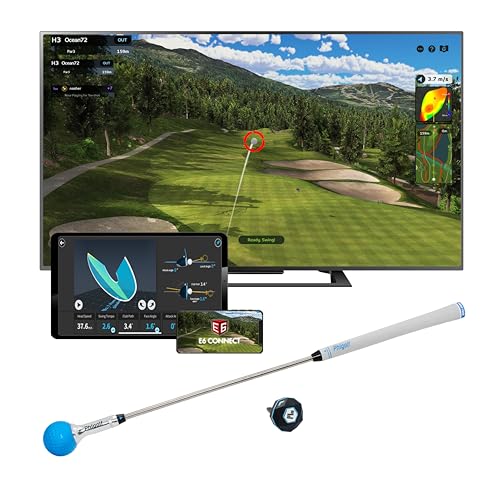
1. PHIGOLF Portable Home Simulator with Interactive Motion Sensor and Global Course Access
- HOME GOLF, MADE EASY: Enjoy interactive golf on compatible Android or iOS devices with the Phigolf...
- PLAY 38,000+ COURSES: Explore real-world courses and multiple game modes through Phigolf and E...
- MOTION-TRACKED SWING PLAY: The 9-axis motion sensor captures your swing movement and brings it into...
Tight indoor spaces rarely encourage authentic practice sessions, yet the PHIGOLF system breaks that mold with its compact design. Experience over 38,000 global courses right from your living room, blending variety with convenience like never before.
Integrated Bluetooth connectivity pairs seamlessly with your device, allowing you to track every swing with precision via a lightweight sensor that clips onto your club or swing stick. Its aluminum build and adjustable length mimic the feel of a real golf club while remaining portable and easy to handle.
Firmware and app updates ensure smooth interactive gameplay, while multiplayer support invites up to four participants to compete effortlessly. Whether indoors or in the yard, the Phigolf swing stick facilitates realistic practice without the need for bulky nets or balls.
Unlike bulky simulators demanding vast setups, this solution is designed for easy transport and quick assembly, making it ideal for travel or small homes. Phigolf offers a space-saving yet immersive experience that challenges assumptions about what home golf training can be.
Best for: Golfers seeking a versatile, travel-friendly simulator that fits in minimal space and offers extensive course variety.
Pros:
- Access to 38,000+ courses worldwide through the intuitive app
- Lightweight, portable swing stick with a comfortable steel shaft
- Bluetooth sensor enabling accurate swing analysis
- Supports multiplayer gaming for social play
- Compatible with Android, iOS, and E6 Connect software
Cons:
- May require additional net setup for outdoor ball use
2. Garmin Approach R10 Portable Launch Monitor & Simulator Bundle with Charger and Tripod Stand
- Get More from Your Game: Train anywhere with the Approach R10 launch monitor and golf simulator...
- Portable Launch Monitor That Brings the Course to You: This golf launch monitor portable device is...
- Measures Key Metrics and Preloaded Courses: Improve your game with this Garmin launch monitor that...
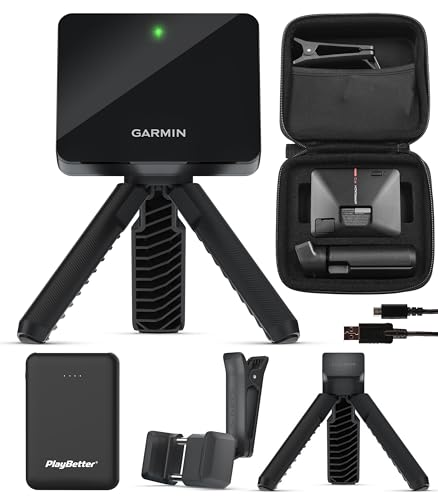
Bringing a full golf training experience directly to your practice space has never been this accessible. With a lightweight design and tripod stand, this Garmin device transforms any spot into a personalized driving range or full course.
Utilize comprehensive shot tracking that measures club head speed, ball speed, launch angle, and spin to sharpen every aspect of your swing. The inclusion of swing video recording through a smartphone app allows you to visually dissect and improve your technique.
Enjoy access to over 43,000 virtual courses through the upgraded Home Tee Hero app, featuring realistic graphics and on-course practice modes to simulate true play conditions. A long-lasting 10-hour battery and portable charger ensure continuous use without interruption.
Garmin’s bundle offers all the essentials—monitor, charger, tripod, phone mount, and carry case—making setup fast for indoor or outdoor use. Its Bluetooth connectivity and capacitive touchscreen provide easy app control and navigation through detailed performance data.
Best for: Golf enthusiasts wanting a compact, versatile system for detailed practice in any location.
Pros:
- Portable and lightweight design for use anywhere
- Accurate measurement of multiple swing and ball metrics
- Access to thousands of realistic virtual courses
- Automatic swing video capture for in-depth analysis
- Comes with essential accessories for ready-to-go setup
Cons:
- User experience might improve with more offline functionality in the app
3. Swinora Portable Golf Launch Monitor with 3D Simulation and Advanced Swing Metrics
- ZERO ANNUAL FEES + ENVIRONMENTAL SENSORS: Enjoy a great app with zero subscription required...
- EXPANDED METRICS & SPACE REQUIREMENT: Tracks Attack Angle, Launch Angle, Spin Rate, Ball Speed, and...
- MULTI-ANGLE PRACTICE VIEWS & SMART ALERTS: Review your swing using fixed multi-angle practice views...
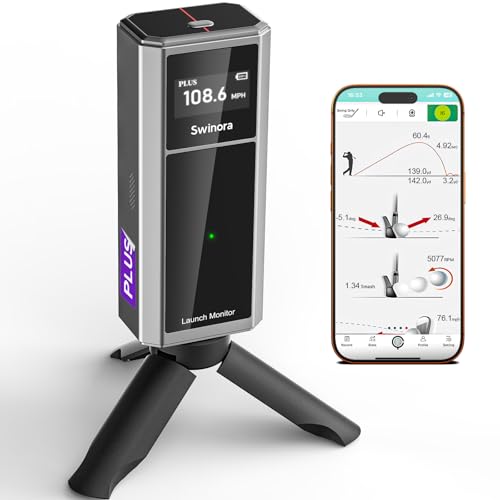
Capturing your golf swing’s true performance can be surprisingly complex without the right tools. The Swinora device steps up by delivering detailed analytics like attack angle, spin rate, and vertical clubface data through an easy-to-use portable design. Its smart sensors adjust your stats to reflect real-time environmental conditions, ensuring every shot counts whether inside or out.
The immersive 3D virtual driving range lets you visualize ball trajectory with dynamic viewing angles, making practice sessions feel more engaging and informative. Smart audio alerts help distinguish perfect hits from mishits to keep your data reliable and your focus sharp.
Calibration options allow you to tailor distance tracking for each club, bridging the gap between practice results and on-course performance. Featuring a robust aluminum body and OLED display, it’s built to withstand regular use, while the handy app offers voice feedback and smooth connectivity.
Swinora’s solution forces a rethink of typical budget-friendly golf tech by combining precision, customization, and interactive simulation without recurring fees. Lifetime use with no subscriptions means you can focus purely on improving your game.
Best for: Golfers seeking a cost-effective yet professional-grade setup for swing analysis and training at home or on the range.
Pros:
- Environmental sensors auto-adjust shot data for real conditions
- Expanded swing metrics including clubface vertical data
- 3D driving range simulation with multiple viewing modes
- Distance calibration for personalized club performance tracking
- Durable metal body with OLED display and voice feedback
Cons:
- The learning curve for setup and calibration might take some initial effort
4. OptiShot Orbit Golf Simulator with Launch Monitor and Orion Software – 20 Courses Included
- Golf Simulator – Comes out of the box with LIFETIME ACCESS!!!
- Second to None – No subscription + no monthly fees + No annual fees
- Included – 20 Real-World Courses + 3 driving ranges + Online Play
Capturing the nuances of your swing just got more accessible with OptiShot’s latest golf simulation system. It provides comprehensive swing analysis and tracks every flight metric using the integrated launch monitor, elevating home practice sessions beyond basic drills.
Unlike traditional simulators that often lock users into recurring fees, this system offers lifetime access to its full suite of features without any subscription or annual costs. You can enjoy 20 authentic golf courses and 3 driving ranges, ensuring variety and realism in your practice.
Engineered to support multiplayer fun with rounds accommodating up to 8 players, the Orion software introduces an engaging dimension to virtual golf. Online play capabilities expand opportunities to connect and compete beyond home settings.
Trusted by enthusiasts through the OptiShot brand, this simulator blends convenience with serious feedback, making it ideal for those seeking a balance between affordability and detailed performance tracking.
Best for: Golf practice enthusiasts who want a budget-friendly yet feature-rich setup capable of detailed swing metrics and multiplayer play.
Pros:
- No ongoing fees—one-time purchase grants lifetime access
- 20 real-world courses plus 3 driving ranges
- Supports up to 8 players for group rounds
- Precise launch data integration with MySwingCaddie app
- Online multiplayer mode included
Cons:
- May require some space for optimal setup
5. Skymons Portable Launch Monitor GX-02 with 10-Hour Battery & Advanced Swing Metrics
- Advanced Environmental Sensors: Built-in temperature, humidity, and barometric pressure modules...
- Expanded Swing Metrics: Monitor with your smartphone to transform any space into a golf simulator...
- Immersive 3D Simulation: Experience a 3D virtual driving range with multiple viewing options...
Imagine transforming any corner of your home or a friendly outdoor spot into a high-tech practice range. The Skymons Portable Launch Monitor offers a sophisticated way to analyze your golf swing without expensive setups or permanent installations. Equipped with advanced environmental sensors, it adjusts data for real-time conditions like temperature and barometric pressure, giving you more accurate insights every session.
Track deeper metrics such as attack angle, launch angle, and spin rate with clear clubface impact visuals. This tool goes beyond basic tracking to deliver professional-level swing analysis directly to your smartphone using an intuitive app compatible with iOS, Android, and HarmonyOS.
Enjoy an immersive 3D simulation experience showing your ball’s flight path from multiple angles. Whether indoors or outdoors, it supports focused training with features like swing-only mode and efficiency ratings, enabling you to hone consistency and technique wherever you practice.
Skymons designed this lightweight metal device with portability in mind, providing up to 10 hours of battery life so your sessions won’t be cut short. Its precise metrics and user-friendly app integration empower you to refine your game without breaking the bank.
Best for: Golfers looking to enhance their swing analysis on a budget, those needing flexible practice options both indoors and outdoors, and players eager to track multiple swing metrics easily.
Pros:
- Accurate shot data adjusted for environmental conditions
- Comprehensive swing metrics including spin and attack angle
- Realistic 3D ball flight simulation for smarter practice
- Durable metal construction with long-lasting battery
- Compatible with multiple smartphone systems and languages
Cons:
- May require some initial familiarization with app features for beginners
- Advanced metrics could be more than needed for casual players
Key Specs Compared: Top Best Cheap Golf Simulator Features
| Product Name | Portability & Setup | Course Access | Metrics & Features | Material & Dimensions |
|---|---|---|---|---|
| PHIGOLF Portable Swing Stick | Lightweight 9.8g sensor; Bluetooth pairing; no net/ball required | Access to 38,000+ courses worldwide; 9 classic + 8 HD included | Swing sensor; multiplayer up to 4 players; indoor/outdoor use | Aluminum; Stick size 21.2~27.6 inches; 0.59 kg |
| Garmin Approach R10 Launch Monitor | Lightweight, tripod mount; 10-hour battery; portable bundle included | Play virtual rounds on 43,000+ courses worldwide | Club head speed, ball speed, spin, swing tempo; swing video capture | LCD Display 1280×800; Compatible with smartphone; Windows OS |
| Swinora Golf Launch Monitor | Portable with tripod; OLED display; no subscription fees | Indoor/outdoor use; 3D driving range and trajectory visualization | 13 metrics including attack and launch angle; video record | Aluminum body; 8.54 x 6.69 x 1.93 inches; 0.67 kg |
| Optishot Orbit Golf Simulator | Out of box setup; no subscription; online play for up to 8 players | Includes 20 courses + 3 practice ranges; lifetime access | Precise swing & flight metrics; MySwingCaddie App integration | Compact size 10.35 x 6.22 x 1.97 inches; 0.88 kg weight |
| Skymons Portable Launch Monitor | Portable with charging line; no subscription; supports IOS/Android/HarmonyOS | Indoor/outdoor use; custom distance calibration (80-120%) | Spin rate, swing speed, attack angle; 3D simulation with multiple views | Metal body; 8.5 x 6.61 x 2.01 inches; 0.7 kg weight |
Which Features Matter Most When Choosing the Best Cheap Golf Simulator?
Finding an affordable golf simulator that truly improves your game requires more than just price comparison. Key factors reveal how well a simulator performs and how seamlessly it fits into your lifestyle. Focusing on these aspects helps avoid costly mistakes and delivers genuine practice value.
Portability and Setup Convenience
Portability defines where and how easily you can use your golf simulator. It’s the difference between lugging heavy gear to a friend’s place or practicing anytime in your own space. Lightweight, compact designs with quick setup save time and hassle, making consistent practice much more achievable.
For example, the PHIGOLF system uses a 9.8-gram sensor clipped to your club and requires no net or real ball, emphasizing ultra-light travel. The Garmin Approach R10 pairs with a tripod stand and boasts a 10-hour battery life for extended use without reconnecting cables or searching for outlets.
Ignoring portability often leads to abandoned practice routines. Bulky, complicated setups reduce motivation and limit your swing improvement. Ensuring ease of transport and minimal assembly keeps you engaged and ready to play, no matter where you are.
Access to Golf Courses and Simulation Variety
The selection of courses available on a golf simulator shapes how fun and lifelike your practice feels. Having a broad range means you can try out different layouts, challenges, and conditions, making each session feel fresh and true to real play.
With the Garmin Approach R10, you get access to over 43,000 courses worldwide, offering nearly limitless variety. PHIGOLF also stands out, featuring more than 38,000 courses, including several classic and HD versions preloaded. This mix balances quantity with quality, appealing to diverse preferences.
Choosing a simulator with fewer courses means missing out on valuable chances to tackle unique shots and test various strategies. Variety keeps practice interesting and helps steadily sharpen your game over time.
Accuracy and Range of Swing Metrics
Precise swing data is the backbone of effective golf practice. Without accurate metrics, it’s tough to pinpoint what aspects of your swing need work or what you’re doing well. Detailed feedback paints a clear picture of your performance, guiding smarter adjustments.
Swinora’s monitor tracks 13 separate metrics, like attack angle and spin rate, while Garmin focuses on essentials such as club head speed, launch angle, and ball spin. These devices rely on advanced sensors and algorithms that compensate for environment changes, delivering reliable data every time.
Without trustworthy metrics, you risk chasing the wrong corrections and wasting practice time. Getting precise, comprehensive feedback ensures your efforts directly improve your game, turning swings into meaningful progress.
Material Quality and Device Durability
The quality of materials shapes how well a golf simulator holds up against daily use and travel. Choosing devices built from sturdy, reliable materials is key to keeping performance steady over time.
For example, both PHIGOLF and Swinora use aluminum bodies, balancing lightness with solid strength. Meanwhile, the OptiShot Orbit focuses on a compact, tough design that won’t weigh you down and stands up to wear and tear.
Picking a simulator with strong build quality means fewer worries about damage or sensor issues. This leads to a better, uninterrupted practice experience and saves you from expensive repairs and downtime.
Software Features and User Interface
Software ease and engaging interfaces shape how fun and effective your practice sessions are. Features like multiplayer options, swing video capture, and simple course choices really boost interaction and usefulness.
PHIGOLF offers multiplayer support for up to 4 players, making it great for social play. Garmin’s system includes smartphone swing video recording, so you get clear visual feedback. Meanwhile, OptiShot combines the MySwingCaddie app with no ongoing fees, ensuring smooth, budget-friendly software use over time.
Ignoring software design can lead to frustration, complex menus, and an overall dull experience. This often causes features to be overlooked, turning your investment into a missed opportunity instead of a valuable tool.
Battery Life and Power Management
Battery life determines how long you can use a golf simulator without interruption. Having a longer battery means more freedom to practice anywhere, while smart power management helps avoid the hassle of constant recharging.
The Garmin Approach R10 impresses with a solid 10-hour battery, perfect for long training sessions or multiple rounds. On the other hand, compact options like Skymons offer USB charging compatibility, which lets you quickly refill power on the go.
Poor battery life can cut your sessions short or force you to stay near an outlet, breaking your rhythm. Reliable power management keeps your focus sharp and ensures you get the most from every practice opportunity.
Subscription Costs and Lifetime Access
Subscription fees can seriously affect how affordable a golf simulator really is. Some models include free lifetime access, meaning no annoying recurring charges that add up over time. This setup also prevents limitations on what content you can enjoy.
For example, the OptiShot Orbit stands out because it offers complete software access without any subscription requirements. PHIGOLF takes a similar approach, providing an upfront package with plenty of courses included. These choices make a big difference in total investment and the freedom users get.
Picking a simulator with lifetime access means you won’t be caught off guard by surprise fees. It gives you full usage without financial stress, letting you focus on improving your game without worrying about extra costs.
Frequently Asked Questions
What features should I look for in the best cheap golf simulator?
A top budget golf simulator blends accurate swing metrics with ease of use and reasonable portability. This balance helps golfers practice effectively without bulky setups. Look for systems offering key shot data like club and ball speed, launch and spin angles, alongside a user-friendly interface.
For example, the Garmin Approach R10 provides extensive shot tracking and swing video capture that elevate training opportunities at home or on the go. Course variety is another factor; simulators granting access to thousands of courses add variety without extra cost.
Pro tip: prioritize simulators compatible with smartphones or tablets to avoid pricey additional hardware.
How portable are cheap golf simulators for home or travel use?
Many affordable golf simulators emphasize portability with compact sensors and lightweight components that fit easily into golf bags or backpacks. This portability suits practicing in tight indoor spaces or trips to the range.
The PHIGOLF Portable Swing Stick, for instance, weighs under 0.6 kg and uses a clip-on sensor, making it easy to set up anywhere without nets or balls. Similarly, Garmin’s tripod mount design aids quick placement and breakdown.
Beware that some systems require power outlets or stable internet, limiting true portability.
Can cheap golf simulators offer accurate swing analysis?
Surprisingly, several budget options deliver detailed and accurate swing metrics through advanced sensors and software. Look for simulators that track multiple data points beyond basic speed, such as attack angle, spin rate, and launch angle.
The Swinora and Skymons models stand out by providing real-time environmental adjustments for improved accuracy, simulating outdoor conditions indoors.
Keep in mind that cheaper models may sacrifice some precision compared to premium systems, so managing expectations is key.
Are subscription fees necessary for full access to golf simulator features?
Not always. Some inexpensive golf simulators include lifetime access to software features and course libraries without recurring fees. This can add significant value over time by avoiding unexpected costs.
The OptiShot Orbit, for example, offers 20 included courses and lifetime software access with no subscriptions. Other devices may charge for premium courses or additional content.
Check for any fine print on access limitations before committing, especially if you want a wide range of course options.
How do golf simulators handle course variety and multiplayer options?
Course selection differs substantially across budget simulators. The best cheap units often provide access to thousands of global courses, enhancing replay value and practice diversity.
PHIGOLF supports multiplayer modes for up to 4 players, combining social play with extensive course libraries exceeding 38,000 locations worldwide, which is rare at this price point.
Consider your preference for solo practice versus group sessions when choosing a simulator, as multiplayer features can be limited on some models.
Finding a cheap golf simulator that actually makes practice count
Landing a golf simulator on a budget that doesn’t cut corners changes how you practice indoors. These devices convert small spaces into effective training spots. You get real-time feedback on your swings and access to virtual courses worldwide. Pick one with detailed swing metrics and an extensive course library to turn practice from guesswork into clear progress. This way, every session feels meaningful and helps you improve.
Which cheap golf simulator suits your style and space?
If space is tight and casual play is your goal, the PHIGOLF Portable Swing Stick shines. It pairs lightweight design with Bluetooth access to over 38,000 courses. For detailed swing data and video replay, the Garmin Approach R10 offers advanced stats and portability. Gamers who want multiplayer and immersive visuals should check out the Swinora. The OptiShot Orbit fits those avoiding subscriptions but needing easy setup and lifetime course access.
Start swinging smart without hidden pitfalls
Budget simulators can vary in setup, so know your space and preferences. Some need tripods or open room, while others clip on compactly. Calibration before each session helps avoid mismatched data. Many models sync well with phones or computers, making swing reviews smooth. Picking the right one streamlines practice and keeps you focused on improvement every time you play.
Last update on 2026-10-12 / Affiliate links / Images from Amazon Product Advertising API