
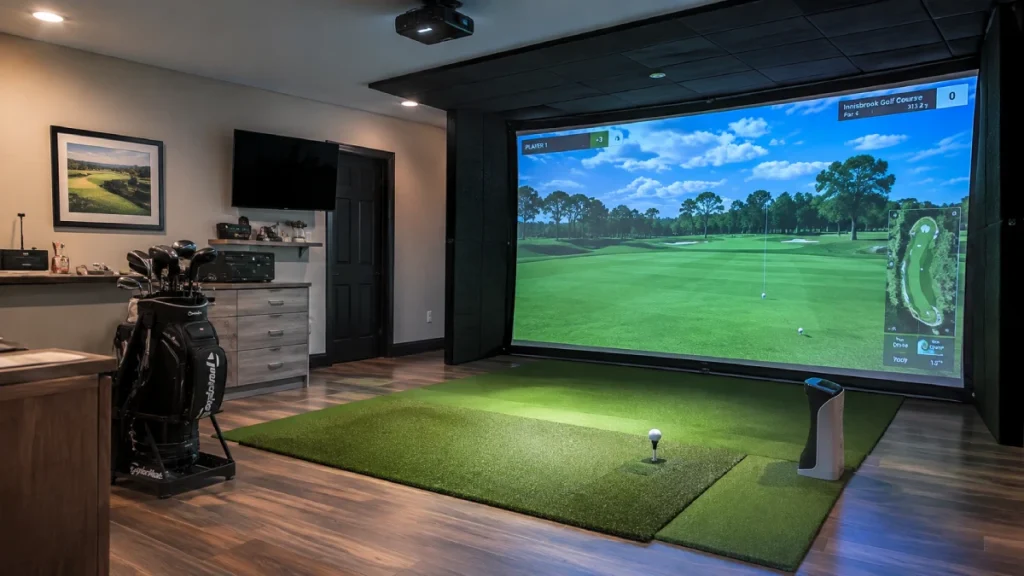
You’ll find golf simulators worth it if you prioritize year-round practice, data-driven feedback, and space to set one up. They offer convenience by removing weather and timing limits and support focused swing improvement.
Costs vary widely from entry-level DIY kits to premium systems, so aligning your budget with your usage and training goals is key.
Keep in mind, realism and scoring differ from outdoor play due to technology constraints. Exploring these factors will clarify if a simulator matches your needs.
- Key Takeaways
- Reasons Golfers Choose Simulators for Practice and Play
- Golf Simulator Costs and What’s Included
- Space and Setup Needed for a Home Golf Simulator
- How Golf Simulators Improve Swing Consistency and Feedback?
- Limitations of Simulator Accuracy and Realism
- When Golf Simulators Are Worth the Investment?
- Frequently Asked Questions
- How Do Golf Simulators Compare to Virtual Reality Golf Experiences?
- Can Golf Simulators Be Used for Multiplayer Online Competitions?
- What Maintenance Is Required for Home Golf Simulators?
- Are Golf Simulators Compatible With Custom Club Fitting?
- How Do Simulators Handle Different Golf Ball Types or Brands?
- Final Thoughts on Whether a Golf Simulator Is Worth It
Key Takeaways
- Golf simulators provide year-round practice access, removing weather and daylight constraints for consistent skill improvement.
- Investment is most justifiable for frequent golfers prioritizing structured, data-driven swing feedback and focused training.
- Costs range widely from $3,000 DIY setups to $70,000+ commercial systems, with additional expenses for software and accessories.
- Proper space, setup, and quality components are essential to maximize simulator accuracy and user experience.
- Simulators excel at technical practice but lack full realism, missing outdoor variables and psychological pressures of real courses.
Reasons Golfers Choose Simulators for Practice and Play
Although outdoor golf remains the traditional choice, many golfers turn to simulators because they offer unmatched convenience and year-round accessibility.
You’ll find that indoor play eliminates weather and daylight constraints, allowing practice whenever you want. Nearly 60% of users cite this flexibility as a primary motivation.
Simulators also provide easier access than crowded courses or limited tee times, supporting more frequent, focused practice sessions, especially for improving iron shots and swing consistency.
Commercial venues have rapidly expanded, reflecting strong market demand for indoor golf options.
Whether at home or a facility, simulators let you maintain skill development without relying on external factors.
This accessibility, combined with the ability to practice specific techniques repeatedly, explains why so many golfers choose simulators to complement or supplement traditional play.
Many home setups feature durable enclosure designs that provide safety and realistic practice environments perfect for garages or dedicated rooms.
Golf Simulator Costs and What’s Included
Golf simulator costs can really vary! You might start seeing prices around $3,000 for some basic DIY setups, but then you can also find commercial-grade systems that go for over $70,000. Quite the range, right?
So, what’s included in those prices? Well, typically, you’ll get hardware like sensors, projectors, and enclosures. And don’t forget about the software licenses; some of those may come with ongoing subscription fees.
It’s definitely worth taking the time to understand these price ranges and what components you’ll get. This way, you can better assess the upfront investment based on your specific needs and how often you plan to use the simulator.
Many top-tier projectors now feature ultra short throw designs, which are ideal for indoor golf simulation in smaller spaces without causing player shadowing.
Price Ranges Explained
When considering a golf simulator, understanding the price ranges and what each tier includes is essential for making an informed decision.
Entry-level DIY setups typically cost between $3,000 and $8,000, offering basic components suitable for casual use.
Mid-range turnkey packages range from $8,000 to $25,000, integrating more advanced technology and convenience features.
Commercial-grade systems command $18,000 to $70,000 or more, reflecting higher accuracy, durability, and brand prestige.
Beyond initial purchase, premium systems often require additional investments in enclosures, projectors, sensors, and professional installation.
Keep in mind that software subscriptions, which can run from $200 to $750 annually, may add to ongoing costs.
Balancing your budget with desired system capabilities will help assure you select a simulator that fits your needs and usage frequency.
Many packages also differ significantly in sensor technology, which impacts accuracy and user experience.
Included Components Overview
Because golf simulators combine multiple technologies, understanding which components come included with your purchase is essential for evaluating overall value.
Typically, a full simulator package includes a launch monitor or sensor system, a projector, a hitting mat, an impact screen, and simulation software.
Higher-end systems may also offer enclosure frames, lighting, and advanced tracking technology.
Installation services might or mightn’t be part of the deal, so factor in potential additional costs.
Pay attention to software licensing—some require annual subscriptions, adding to ongoing expenses.
Basic DIY kits may exclude essential accessories, pushing costs higher as you customize.
Knowing exactly what’s included helps you compare options fairly, avoid surprises, and decide if a turnkey package or a modular build better suits your budget and space constraints.
Additionally, selecting a launch monitor with reliable indoor tracking accuracy is critical for consistent performance and realistic simulation experiences.
Space and Setup Needed for a Home Golf Simulator
Although golf simulators offer great convenience, setting one up at home demands careful consideration of space and layout requirements.
You’ll need a dedicated area with enough room to swing freely and accommodate equipment safely. Proper placement of the projector, sensors, and enclosure is essential for accurate tracking and immersive play.
Consider these key factors:
- Ceiling Height and Width: Allow at least 9 feet height and 10 feet width to guarantee full swing clearance and sensor range.
- Room Depth: You’ll want 12 to 15 feet depth for ball flight space and projector distance.
- Lighting and Surface: Control ambient light to improve screen visibility. Use a non-slip, durable floor to support repeated swings.
Additionally, selecting a simulator with built-in environmental sensors can enhance accuracy by adjusting for room conditions.
Planning carefully prevents installation issues and maximizes your simulator’s performance.
How Golf Simulators Improve Swing Consistency and Feedback?
Once you’ve set up your golf simulator with the appropriate space and equipment, you can focus on how it enhances your swing consistency and delivers valuable feedback.
Simulators use launch-monitor technology to track critical data points like clubhead speed, launch angle, ball spin, and impact location.
This immediate, precise feedback helps you identify flaws and adjust your mechanics quickly.
By practicing indoors without weather or course distractions, you can isolate specific swing elements and repeat them consistently.
The ability to analyze shot metrics after every swing supports deliberate practice, reinforcing muscle memory and improving ball-striking contact.
Over time, this structured approach fosters greater consistency in your swing, as the data-driven insights guide your technique refinement objectively and efficiently.
Choosing a launch monitor with near-zero latency ensures real-time feedback that enhances your practice sessions.
Limitations of Simulator Accuracy and Realism
You know, the accuracy of simulators really depends on the quality of the launch monitor technology. Basically, these monitors typically only capture the initial conditions of the ball before simulating its entire flight. So, right off the bat, you’re missing some key real-world factors.
And let’s be honest, the simulated environment doesn’t account for things like wind, uneven terrain, or even pressure changes. That’s why there can be a noticeable difference between what you see on the simulator and how it feels out on the course.
Oh, and here’s another thing: the realism of the experience can vary a lot based on how much you’re willing to spend. Higher-end systems tend to provide more accurate data and a more immersive experience, while budget models mightn’t deliver the same level of detail. So, if you’re looking for that authentic feel, investing in a good simulator can really make a difference!
Many advanced systems use radar-based tracking to capture detailed swing and ball data, improving the precision of the simulation.
Launch Monitor Limitations
Because launch monitors form the core of a golf simulator’s feedback system, their limitations directly impact the accuracy and realism of the experience. When you rely on a launch monitor, you should understand that its data accuracy varies based on technology, environment, and sensor quality.
Key limitations include:
- Partial Data Capture: Many monitors track only initial ball launch conditions. They use algorithms to estimate the full flight, which can introduce errors.
- Environmental Factors: Indoor settings lack variables like wind or uneven lies. Measurements don’t fully replicate outdoor play complexity.
- Sensor Precision: Lower-end sensors may struggle with consistent readings on spin rate, launch angle, and club path. This reduces shot feedback reliability.
Recognizing these constraints helps you set realistic expectations when evaluating golf simulator performance. Additionally, understanding the differences between photometric and radar tracking technologies can clarify why certain launch monitors perform better in specific environments.
Simulated Environment Differences
Although golf simulators offer impressive technology, they can’t fully replicate the complexities of real-world play. You’ll notice that simulators often rely on launch monitors capturing initial ball data and then model the subsequent flight, which introduces estimation errors.
Environmental factors like wind, uneven lies, and course conditions are absent, limiting realism. The mental pressures and decision-making nuances you face on an actual course don’t translate indoors.
Simulated scoring tends to be markedly lower, reflecting perfect conditions. While high-end systems narrow these gaps, budget setups exhibit greater discrepancies.
Understanding these limits helps you set realistic expectations. Simulators excel at consistent practice and technical feedback but fall short in replicating the full scope of outdoor golf’s variable environment and psychological demands. Additionally, the inability to simulate outdoor variables such as terrain and course hazards further limits the overall realism of indoor play.
Realism Versus Budget
The level of realism you experience in a golf simulator often depends heavily on the budget you allocate. Higher-end systems invest in advanced launch monitors and multiple sensors, capturing detailed ball and club data for accurate shot replication. In contrast, budget setups typically track only initial launch parameters, relying on modeled ball flight, which limits realism.
Consider these factors:
- Accuracy Trade-offs: Budget simulators may produce scores 10–15 strokes lower due to ideal conditions like perfect lies and no wind.
- Environmental Simulation: Low-cost systems can’t replicate weather, uneven terrain, or mental pressure.
- Technology Investment: Premium models require substantial upfront and ongoing costs but deliver superior feedback and immersive play.
Additionally, using a high-quality golf simulator turf can enhance the feel and realism of your indoor practice environment by providing authentic surface response and shock absorption.
Understanding these limitations helps you align expectations with your financial commitment.
When Golf Simulators Are Worth the Investment?
When you play golf frequently and prioritize consistent practice regardless of weather or daylight, investing in a golf simulator becomes more justifiable.
Regular golfers who value consistent practice rain or shine will find a golf simulator a smart investment
You’ll benefit most if you seek structured training, relying on data-driven feedback to improve swing mechanics and ball striking.
The investment aligns well if you have sufficient space for setup and can absorb the upfront costs ranging from several thousand to tens of thousands of dollars.
Additionally, if you value convenience and year-round access over perfectly replicating on-course conditions, a simulator delivers considerable training value.
However, if you play infrequently or prioritize outdoor realism, the high expense and setup complexity might outweigh the benefits.
Ultimately, a golf simulator is worth it when your usage frequency, training goals, and budget converge to maximize its practical advantages.
Frequently Asked Questions
How Do Golf Simulators Compare to Virtual Reality Golf Experiences?
Golf simulators offer more precise swing data and realistic ball physics than most VR golf experiences.
While VR focuses on immersive visuals, it often lacks accurate shot tracking. You’ll get better feedback on launch angles and ball spin with simulators, aiding technical improvement.
However, VR excels in portability and interactive gameplay variety. If you want detailed training, simulators outperform VR, but VR provides a fun, flexible option for casual play without complex setup or space needs.
Can Golf Simulators Be Used for Multiplayer Online Competitions?
Yes, you can use golf simulators for multiplayer online competitions.
Many advanced systems offer network connectivity that lets you compete with players remotely.
You’ll need compatible software supporting online play, reliable internet, and sometimes subscriptions.
These platforms enable real-time scoring, leaderboards, and social interaction, enhancing the competitive experience.
However, the quality depends on the simulator’s tech, latency, and software integration.
Not all setups deliver seamless multiplayer functionality.
What Maintenance Is Required for Home Golf Simulators?
You might be surprised how much maintenance home golf simulators demand.
You’ll need regular cleaning of sensors, projector lenses, and impact screens to guarantee accuracy.
Software updates are essential to keep your data precise and features current.
Calibration checks help maintain shot tracking reliability.
Don’t overlook wear and tear on mats and nets, which require periodic replacement.
Staying proactive prevents performance drops and extends your simulator’s lifespan effectively.
Are Golf Simulators Compatible With Custom Club Fitting?
Yes, golf simulators are compatible with custom club fitting, especially high-end models equipped with advanced launch monitors and sensors.
You can analyze ball flight data, swing speed, and impact conditions, which are essential for fitting.
However, accuracy varies by system quality. While simulators provide valuable metrics for club selection and adjustment, you might still want on-course testing to confirm feel and performance under real conditions for complete confidence in your custom fit.
How Do Simulators Handle Different Golf Ball Types or Brands?
Simulators handle different golf ball types or brands by measuring initial launch data like speed, spin, and launch angle. They then apply algorithms to predict ball flight.
However, variations in ball compression, cover material, and dimple design can affect accuracy. Most systems calibrate better with standard balls, while exotic or damaged balls may skew results.
You’ll find higher-end simulators offer settings to adjust for ball type. Budget models treat all balls similarly, limiting precision.
Final Thoughts on Whether a Golf Simulator Is Worth It
When deciding if a golf simulator is right for you, consider your goals and space carefully.
While simulators offer valuable practice with instant feedback and convenience, they can’t fully replicate real course conditions.
Are you ready to invest in technology that enhances your swing but might fall short on realism?
If consistent practice and analysis matter most, a simulator could be a smart choice. Just weigh the costs and limitations before committing.